
Download TopoMan CAD
Windows, Linux, macOS, Android and the browser, with nothing to install
How to install it
Three ways in, and the first one is the least trouble on Windows.
- Recommended
Microsoft Store
Windows 10 and 11, in 64-bit, 32-bit and ARM. One click to install, updates itself, and no SmartScreen warning: Microsoft signs the package. This is the recommended way.
Download from the Microsoft Store Direct download
Installer and portable for Windows 10, 11, 7 and 8, plus the Android APK. Each with its SHA-256 checksum.
All downloadsIn the browser
Nothing to install, no sign-up. From the second visit it works offline.
Try it in the browser
All downloads
Version 1.0.7One per system and architecture. If in doubt, the Windows installer covers 64-bit, 32-bit and ARM.
No version has been published for download yet. When there is one, it will show up here on its own.
Windows 10 and 11
Version 1.0.7- Installer54.9 MB
x64+x86+arm64
- Portable44.6 MB
arm64
- Portable54.1 MB
x64
- Portable45.3 MB
x86
Windows 7 and 8
Version 1.0.7- Installer39.5 MB
x64+x86
- Portable54.4 MB
x64
- Portable46.0 MB
x86
Android
Version 1.0.7- APK35.2 MB
universal
Linux
- AppImage21.0 MB
arm64
- AppImage22.3 MB
x86_64
- Flatpak13.9 MB
arm64
- Flatpak15.4 MB
x86_64
macOS
Version 1.0.6- DMG21.7 MB
arm64
- DMG24.7 MB
x86_64
Portable: nothing to install, just run it.
What changed in each version: the changelogWindows will warn you, and it is not a virus
These executables are not signed with a paid certificate, so SmartScreen shows a blue screen saying it protected your PC. Click "More info" and then "Run anyway". If you would rather not see that warning, install it from the Microsoft Store: there the package is signed by Microsoft.
Before you install
- Windows 10 and 11: nothing else, on 64-bit, 32-bit or ARM.
- Windows 7 and 8: use the files marked "Windows 7". They need the Visual C++ redistributable: it is below, under "If Windows 7 shows this error".
- Windows on ARM: Windows 10 or later only.
- Android: you have to allow installing from unknown sources, because the APK does not come from Play.
What the checksum is for
It is the signature of the contents. If the one for the file you downloaded does not match the one here, the download was cut short or the file is not mine. On Windows you check it with: certutil -hashfile <file> SHA256
If Windows 7 shows this error
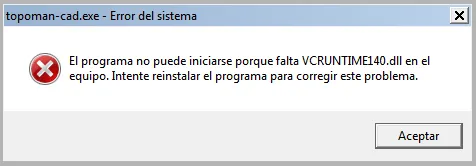
Windows 7 and 8 do not ship the Visual C++ libraries TopoMan CAD needs, and on launch they say "VCRUNTIME140.dll is missing". It is fixed once by installing the Microsoft redistributable: the same file you would download from their site, served from here so it is at hand.
Install the one matching your TopoMan CAD: x64 for the 64-bit build, x86 for the 32-bit one. If in doubt, install both; they do not get in the way. After that, TopoMan CAD opens normally.
- Visual C++ for 64-bit (x64)vc_redist.x64.exe · 14.3 MB
- Visual C++ for 32-bit (x86)vc_redist.x86.exe · 13.5 MB
Microsoft Visual C++ 2015-2022 redistributable, unmodified. Windows 7 needs Service Pack 1.
On everything you have
The same program and the same file. What you draw in the office opens on the phone, in the field.
Windows
10 and 11, in 64-bit, 32-bit and ARM. And 7 and 8 too, with their own build
Android
The whole application, with a touch interface and stylus. And with a monitor, keyboard and mouse, the desktop interface
Browser
Nothing to install, and it works offline from the second visit
Linux
AppImage and Flatpak, on x86_64 and ARM64
macOS
Intel and Apple Silicon
The Microsoft Store requires Windows 10 or later. Windows 7 and 8 have their own build, which comes through the direct download.